

Adding WooCommerce Orders to Airtable Automation
TL;DR.
Maven X enhances client engagement through automated follow-up emails after project completion, saving time and ensuring accuracy. The Add Complete Store Orders to Airtable automation streamlines order updates, integrating various platforms seamlessly.
Script Content
Introduction.
Hi, I’m Noah from Maven X. In this video we’ll see how Maven X uses automation to add completed store orders to our Airtable CRM for financials tracking.
This is part of our business automation series, where we showcase how automation has helped Maven X streamline operations, drive growth, and ensure precision. As you watch, consider how automation can save your business time, eliminate repetitive tasks, and enhance accuracy, ultimately boosting your productivity.
Problem Statement.
One common challenge businesses face is manually updating records and locations for completed sales orders on different platforms into a centralized location. This process can be time-consuming, error-prone, and inefficient, especially with a high volume of orders. This type of automation can be used if you are using Hubspot, Quickbooks, and many more!
High Level Explanation.
That’s why we created our Add Complete Maven X Store Orders to Airtable automation. This solution ensures that that every completed order is efficiently recorded in Airtable to track our sales and financials within our CRM, and that the team is promptly notified via Slack of our sales.
Demonstration.
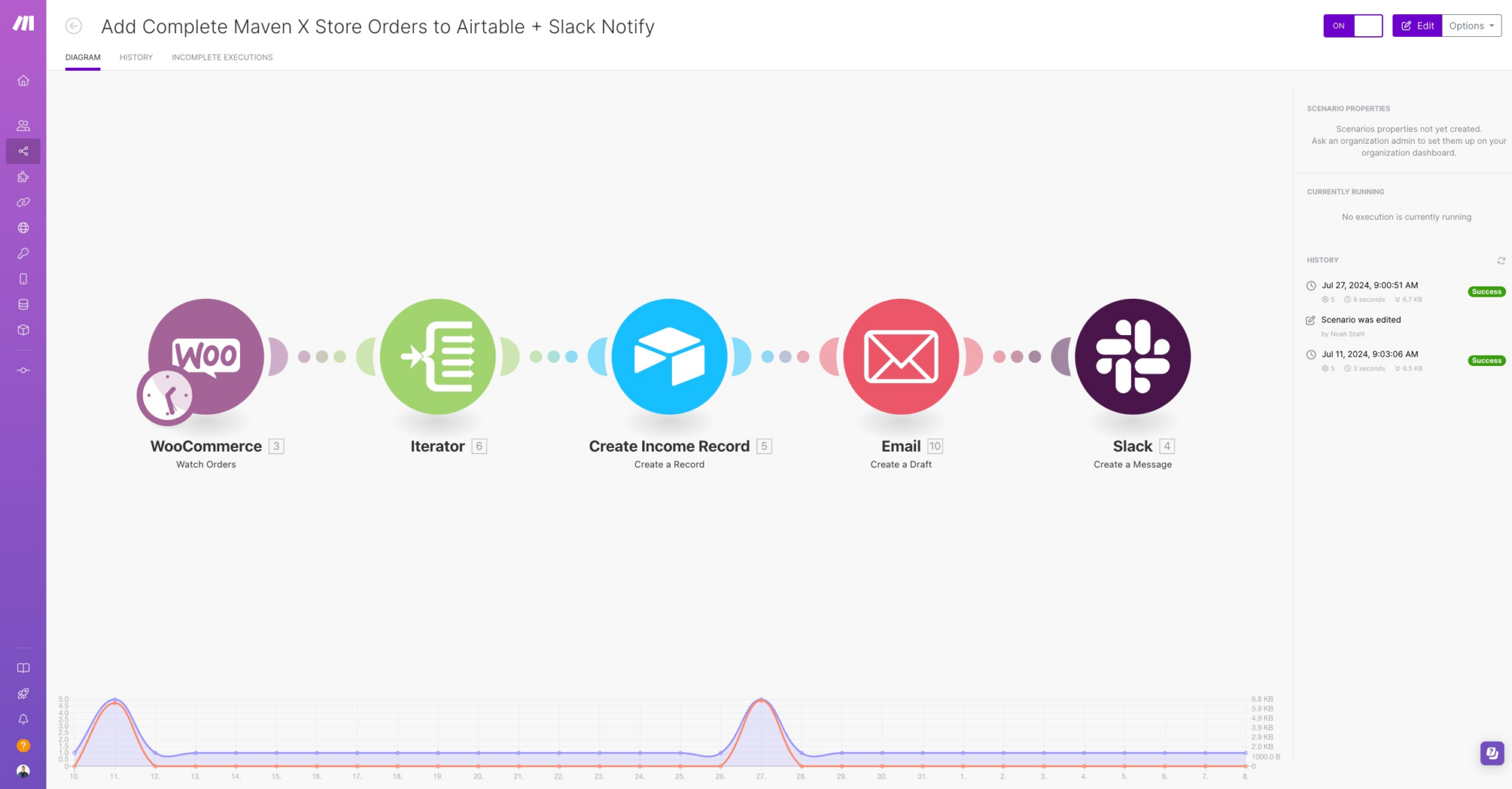
Now let’s see how the automation works:
- WooCommerce Order Watcher: The automation starts when a completed order is detected in WooCommerce.
- Basic Feeder: The order details, line items, are fed into the next steps. This ensures that each item in the order is tagged to the product in the CRM in the next step.
- Airtable Record Creation: A new record is created in Airtable, capturing all relevant order details such as the item name, total amount, processing fees, and completion date.
- Email Draft Creation: A draft email is created in Gmail, addressing the customer and requesting feedback on their purchase. The Maven X Store is still fairly new and we took the approach to get more custom feedback from users on their experience to better update the store vs. using an informal feedback system.
- Slack Notification: A message is sent to the designated Slack channel, notifying the team of the new completed order.
Benefits Recap.
By automating this process, we gain a few benefits like:
- Efficiency: This automation eliminates the need for manual updates and notifications, saving significant time and effort.
- Accuracy: Automated data handling reduces the risk of errors in recording order details. It also ensures that our financial numbers on the Maven X Store are accurately reflected in our CRM Dashboards.
- Consistency: Ensures that every completed order is processed and notified in the same manner, maintaining high standards of service.
- Scalability: As the number of orders increases, the automation can handle the load without additional manual effort.
- Timely Communication: Customers receive timely feedback requests, so that we can enhance their experience.
- Improved Workflow: The seamless integration of multiple tools ensures a smooth flow from order completion to team notification and customer follow-up.”
Closing.
Thank you for watching! We hope this video has inspired you to consider the benefits of automation for your business. Be sure to check out our other videos for more automation solutions and success stories.
Until next time, happy automating!
Let's Talk About Your Goals
Tell us what you are working toward and a Maven X team member will get back to you.