

Stripe Income to Airtable CRM Automation
TL;DR.
Maven X introduces its automation that streamlines the import of Stripe income data into Airtable CRM. The process minimizes manual errors, boosts efficiency, and ensures accurate record-keeping.
Script Content
Introduction.
Hi, I’m Noah from Maven X. In this video we’ll see how Maven X uses automation to import Stripe income data into our Airtable CRM.
This is part of our business automation series, where we showcase how automation has helped Maven X streamline operations, drive growth, and ensure precision. As you watch, consider how automation can save your business time, eliminate repetitive tasks, and enhance accuracy, ultimately boosting your productivity.
Problem Statement.
One common challenge businesses face is manually importing income data from payment processors and updating financial records. This process can be time-consuming, error-prone, and inefficient, especially with a high volume of transactions.
High Level Explanation.
That’s why we created our Stripe Income to Airtable CRM automation. This solution ensures that every Stripe transaction is efficiently imported into Airtable, and the team is promptly notified via Slack that a payment was made.
Demonstration.
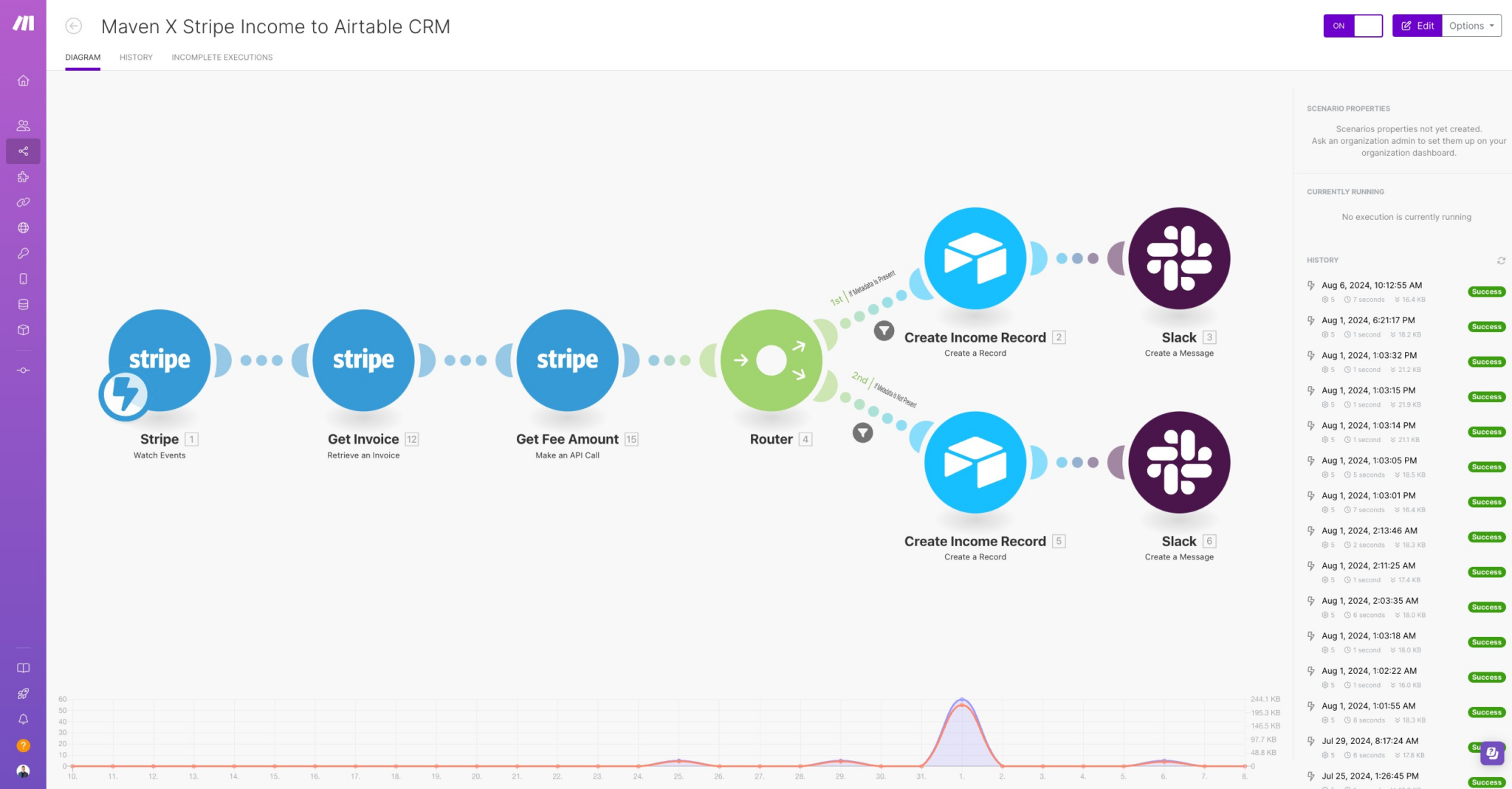
Now let’s see how the automation works:
- Stripe Income Webhook: The automation starts when a Stripe event webhook is triggered for a new transaction.
- Get Invoice: It retrieves the relevant invoice details from Stripe.
- Get Fee Amount: The automation makes an API call to Stripe to get the fee amount for the transaction so we can keep a record on how much we are paying in Stripe fees for each transaction.
- Create Income Record in Airtable: A new record is created in our custom Airtable CRM, capturing details such as the transaction amount, processing fees, payment method, and other relevant information.
- Slack Notification: A message is sent to the designated Slack channel, notifying the team of the new income record and providing a link to the Airtable entry to attach any other missing information that’s needed.
Benefits Recap.
By automating this process, we gain a few benefits like:
- Efficiency: This automation both saves time and ensures all records are created quickly and accurately.
- Accuracy: Automated data handling ensures that transaction details and fees are accurately recorded, reducing the risk of errors.
Closing.
Thank you for watching! We hope this video has inspired you to consider the benefits of automation for your business. Be sure to check out our other videos for more automation solutions and success stories.
Until next time, happy automating!
Let's Talk About Your Goals
Tell us what you are working toward and a Maven X team member will get back to you.